
From product information to a clear carbon result.
Promotional product carbon requests often arrive before the product data is perfectly organised. CarbonLoop gives teams practical starting points, then keeps the information, assumptions and outputs together in one reusable project record.
The overview
What the Carbon Calculator does
The calculator brings product quantity, weight, materials, packaging, production and transport information into a structured workflow. Your team can review what CarbonLoop matched, confirm missing details and keep the calculation with the customer project instead of rebuilding it for every request.
Where supplier information is incomplete, the workflow keeps the remaining checks and any estimates visible before a result or report is shared.

Three ways to begin
Start with the product information you already have
Import an order document
Upload a purchase order, invoice, PDF, spreadsheet or BOM. CarbonLoop extracts products and quantities and shows what needs checking.

Choose a saved SKU
Search the CarbonLoop library or your private company products when a reusable product record already exists.

Describe the product
Enter the available product and order information in normal language so the platform can organise it and highlight details that still require review.
Interface images show the current workflow. Availability of assisted data entry depends on the selected platform setup.
Before calculation
Better inputs create a more useful result
A product name and quantity are a useful start. Material composition, finished weight, packaging, production location, manufacturing method and delivery route give your team a stronger result to review and explain.
Product and quantity
Confirm the SKU, product category, order quantity and finished unit weight.
Materials and BOM
Review the component materials, proportions and packaging information available for the product.
Production and transport
Add the manufacturing location, process and delivery route where that information is available.
The calculation workflow
From order information to a saved carbon result
Import or match
Start with an order document, a product from the SKU Library or the information your team has collected.
Review the product record
Check quantities, materials, BOM information and the other details used to build the calculation.
Calculate and save
Calculate the product footprint and keep the result with the customer project for reuse and reporting.
Plan allowance
How calculation credits work
A calculation credit is used when the platform runs a new calculation using newly supplied or changed information. An unchanged saved result can be reused without running the same calculation again. Your plan determines the calculation-credit allowance available to your account.
Compare current calculation-credit allowances →Understanding the result
Read the result before you share it
Total product footprint
The total CO₂e result gives the headline figure for the calculated product or order.
Emissions breakdown
Review the available contribution categories, such as materials, production and transport.
Data and assumptions
Keep supplied data, database factors and any remaining assumptions visible for internal review.

After calculation
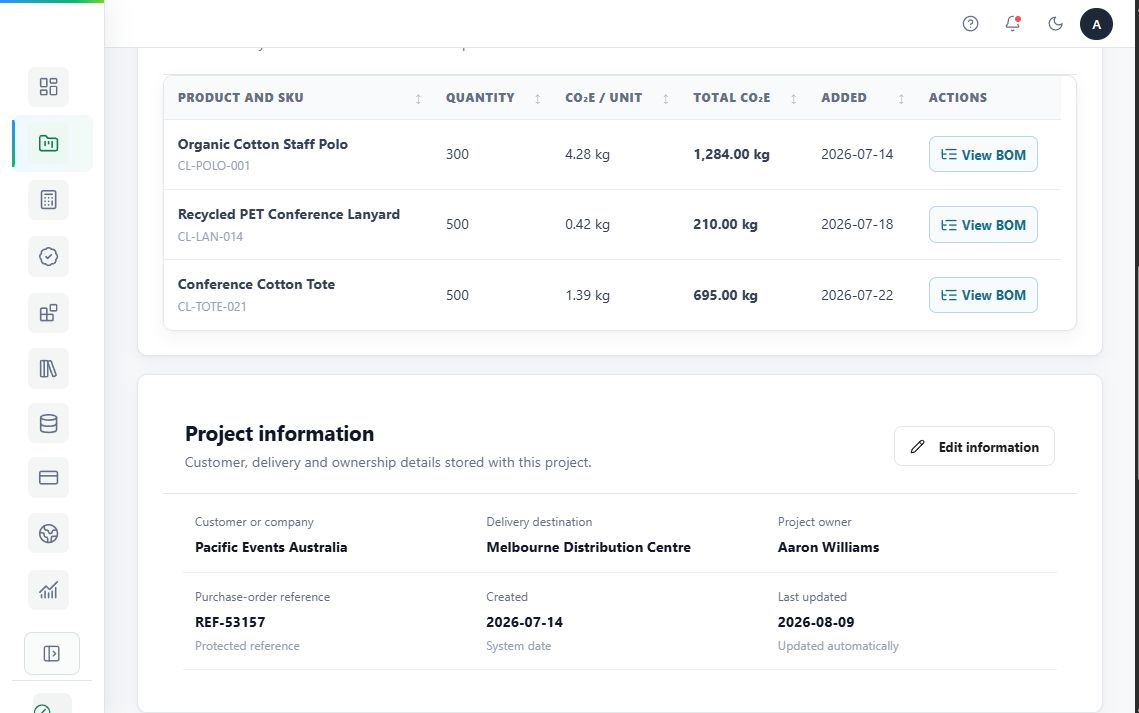
Turn the result into a reusable customer project
Save the project
Keep the products, quantities, assumptions and calculation result together for customer follow-up.
Create a report
Use the saved calculation to prepare a clearer customer-facing report, according to the selected plan.
Review optional carbon credits
After calculating, customers may separately purchase carbon credits and connect the resulting certificate to the project.

Worked example
A customer order for reusable bottles and tote bags

This example illustrates the workflow. Actual results depend on the product and supplier information entered into the calculation.
Common questions
Carbon Calculator FAQs
What files can I upload?
The calculator is designed to begin with common order and product documents, including PDFs and spreadsheets. The available formats are shown in the upload area.
What if my product is not in the SKU Library?
You can start with an order document or enter the product information you have, then review the structured record before calculating.
How accurate is the calculation?
The usefulness of the result depends on the quality and completeness of the product, material, production and transport information available. CarbonLoop keeps the supporting information with the project for review.
What is a calculation credit?
A calculation credit is the plan allowance used when a new calculation runs with newly supplied or changed information.
Are carbon credits included?
No. Carbon credits are optional and purchased separately after the footprint has been calculated.
Can I download a customer-ready report?
Reporting options depend on the selected plan. Compare the current plans or talk to the CarbonLoop team about customer-facing reporting.
Want to see the calculator with your own product data?
Bring an example order, saved SKU, or product description and discuss the most suitable starting route.